Showing posts with label windows. Show all posts
Wednesday, February 20, 2008
Recreate Show Desktop Icon
Show Desktop icon near the Windows XP start button is used to minimize all active windows. The icon/button is located on your Quick Launch bar. This Quick Launch bar folder location is at %appdata%\Microsoft\Internet Explorer\Quick Launch.


Sometimes, people accidentally deleted this icon. To recover this icon/button, you can try to;
Remember to save the file with .scf extension. If everything goes well, the file icon should appear as below automatically.

Sometimes, people accidentally deleted this icon. To recover this icon/button, you can try to;
- Copy the icon from other users %appdata%\Microsoft\Internet Explorer\Quick Launch folder.
- Copy the icon from others machine with Windows XP that still have it on the same location.
- Search the icon entire drive for Show Desktop file (*.scf extension)
- Search the icon in i386 folder from Windows XP installer CD or DVD.
- Create a new icon/button.
[Shell]
Command=2
IconFile=explorer.exe,3
[Taskbar]
Command=ToggleDesktop
Remember to save the file with .scf extension. If everything goes well, the file icon should appear as below automatically.
Tuesday, February 19, 2008
Automatic Completion with a Command Prompt in Windows
UNIX like auto complete is now available on Windows. I believe it is available since Windows 2000. Some versions of Windows do not turn this on by default. It is very useful whenever you are working with a very long file or folder name. Example;
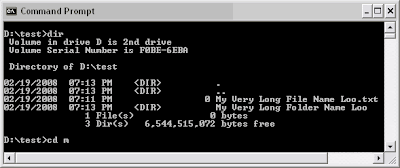
You have a long folder name and you want to change directory into it. Just type cd m and hit TAB key should complete the long folder name automatically for you as below;
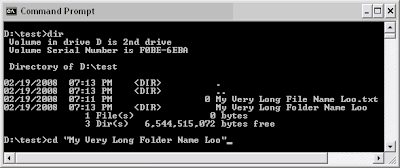
Useful isn’t it? To enable this feature, open the regedit and add "CompletionChar"=dword:00000009 to [HKEY_CURRENT_USER\Software\Microsoft\Command Processor] as below;
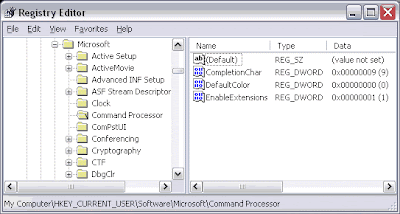
From screenshot above, CompletionChar is set to 0x9, that is the TAB key. If you want to customize you own choice of key, you might want to try 0x4 for Control+D or 0x6 for Control+F. For more info please visit
Microsoft - Help & Support.
You have a long folder name and you want to change directory into it. Just type cd m and hit TAB key should complete the long folder name automatically for you as below;
Useful isn’t it? To enable this feature, open the regedit and add "CompletionChar"=dword:00000009 to [HKEY_CURRENT_USER\Software\Microsoft\Command Processor] as below;
From screenshot above, CompletionChar is set to 0x9, that is the TAB key. If you want to customize you own choice of key, you might want to try 0x4 for Control+D or 0x6 for Control+F. For more info please visit
Microsoft - Help & Support.
Thursday, February 14, 2008
Windows XP Hidden User Accounts Interface (control userpasswords2)
Having more than one person using your computer? If you do, you can create user accounts for everyone so that they can customize their favorites, colors, wallpaper, and private files. Default ‘Windows XP User Accounts’.

Sometimes you might need to fine tune the user accounts. You can do this with a hidden ‘User Account 2’ interface by running control userpasswords2.

This ‘Windows 2000’ style ‘User Accounts’ might be useful for those users that are very familiar with Windows 2000.

So, now you might want to add this shortcut permanently to the ‘Control Panel’. The only way is to add some lines into the 'Windows Registry'.

It is recommended to use *.reg script below to add ‘User Accounts 2’ shortcut to your control panel rather than entering it manually. Copy lines below to a new file and called add_ua2.reg. Note that the extension must be reg. Just right click the file and Merge it. Your computer must be restarted for these to take effect.
Just incase you don’t like it, you can also remove it using *.reg file below. Copy lines below to a new file and called delete_ua2.reg. Note that the extension must be reg. Just right click the file and Merge it. Your computer must be restarted for these to take effect.
Sometimes you might need to fine tune the user accounts. You can do this with a hidden ‘User Account 2’ interface by running control userpasswords2.
This ‘Windows 2000’ style ‘User Accounts’ might be useful for those users that are very familiar with Windows 2000.
So, now you might want to add this shortcut permanently to the ‘Control Panel’. The only way is to add some lines into the 'Windows Registry'.
It is recommended to use *.reg script below to add ‘User Accounts 2’ shortcut to your control panel rather than entering it manually. Copy lines below to a new file and called add_ua2.reg. Note that the extension must be reg. Just right click the file and Merge it. Your computer must be restarted for these to take effect.
Windows Registry Editor Version 5.00

[HKEY_CLASSES_ROOT\CLSID\{18646F66-8C25-0000-BEE4-C2CE1298969D}]
@="User Accounts 2"
"InfoTip"="Starts The Windows 2000 style User Accounts dialog"

[HKEY_CLASSES_ROOT\CLSID\{18646F66-8C25-0000-BEE4-C2CE1298969D}\DefaultIcon]
@="%SystemRoot%\\\\System32\\\\nusrmgr.cpl,1"

[HKEY_CLASSES_ROOT\CLSID\{18646F66-8C25-0000-BEE4-C2CE1298969D}\Shell\Open\command]
@="Control Userpasswords2"

[HKEY_LOCAL_MACHINE\SOFTWARE\Microsoft\Windows\CurrentVersion\Explorer\ControlPanel\NameSpace\{18646F66-8C25-0000-BEE4-C2CE1298969D}]
"Default"="Add Userpasswords2 to Control Panel"
Just incase you don’t like it, you can also remove it using *.reg file below. Copy lines below to a new file and called delete_ua2.reg. Note that the extension must be reg. Just right click the file and Merge it. Your computer must be restarted for these to take effect.
Windows Registry Editor Version 5.00

[-HKEY_CLASSES_ROOT\CLSID\{18646F66-8C25-0000-BEE4-C2CE1298969D}\DefaultIcon]

[-HKEY_CLASSES_ROOT\CLSID\{18646F66-8C25-0000-BEE4-C2CE1298969D}\Shell\Open\command]

[-HKEY_LOCAL_MACHINE\SOFTWARE\Microsoft\Windows\CurrentVersion\Explorer\ControlPanel\NameSpace\{18646F66-8C25-0000-BEE4-C2CE1298969D}]
Wednesday, January 30, 2008
JDK vs JRE vs J2SE vs J2EE vs J2ME ?
Which Java should I download? Can I just download the minimum small file size Java? Well, it depend on what are you need it for. Below explains;
JDK = Java Development Kit
Contains all of the software needed to compile Java source files (.java) into bytecode (.class)
JRE = Java Runtime Environment
Software needed to run the bytecode.
The JRE does come with the JDK. So, if you just want to run Java program, downloading JRE will do. The JRE installer is about 15MB while the JDK installer is about 55MB.
Quick introduction about Java? Read here.
J2SE = Java 2 Standard Edition
JDK + JRE, Java development package.
J2EE = Java 2 Enterprise Edition
JDK + JRE, advance Java development package.
J2ME = Java 2 Micro Edition
JDK + JRE, for handheld devices (cellular phones, palmtops etc.)
Quick way to know your Java version? Type java –version on your dos or shell prompt.
Java version example on WinXP command prompt

Java version example on Solaris 10 shell through PuTTY

More Java version checking methods can be found here
JDK = Java Development Kit
Contains all of the software needed to compile Java source files (.java) into bytecode (.class)
JRE = Java Runtime Environment
Software needed to run the bytecode.
The JRE does come with the JDK. So, if you just want to run Java program, downloading JRE will do. The JRE installer is about 15MB while the JDK installer is about 55MB.
Quick introduction about Java? Read here.
J2SE = Java 2 Standard Edition
JDK + JRE, Java development package.
J2EE = Java 2 Enterprise Edition
JDK + JRE, advance Java development package.
J2ME = Java 2 Micro Edition
JDK + JRE, for handheld devices (cellular phones, palmtops etc.)
Quick way to know your Java version? Type java –version on your dos or shell prompt.
Java version example on WinXP command prompt
Java version example on Solaris 10 shell through PuTTY
More Java version checking methods can be found here
Tuesday, January 29, 2008
NetMeeting on Windows XP
Wondering on how to install NetMeeting on Windows XP? Actually, you don’t have to. Just type conf on the command prompt or Start > Run > conf and hit enter.


Thursday, January 24, 2008
Removing and disabling the thumb.db file in Windows
When displaying files as thumbnails in explorer, a file called thumbs.db will be created automatically by Windows. It help user to view folders and pictures in the thumbnail view much faster since it stores the images. Although the file is small, it may take up a large amount of space soon. It is safe to delete this file but if you would like to stop Windows from creating them again, you can disable it by doing;
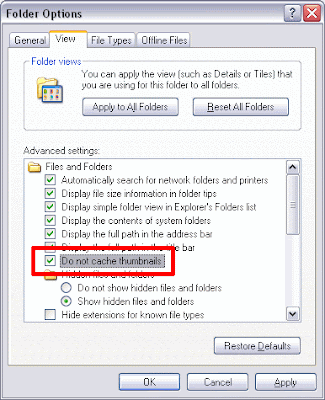
From explorer toolbar, Tools > Folder Options, go to the View tab, tick Do not cache thumbnails.
From explorer toolbar, Tools > Folder Options, go to the View tab, tick Do not cache thumbnails.
Monday, January 14, 2008
Windows 98 / ME / 2000 Thumbnail View Fix
If you are still using Windows 98 / ME / 2000 and found out that explorer image thumbnails is not working, this is probably because of a third party image program changing file type association. To fix this, type regedit at the command prompt and hit enter. Click here to learn more about REGEDIT. Enter this value;

[HKEY_CLASSES_ROOT\.png\ShellEx\{BB2E617C-0920-11d1-9A0B-00C04FC2D6C1}]
@="{7376D660-C583-11D0-A3A5-00C04FD706EC}"
This is to enable thumbnail view for .png extension. How about other file types? Repeat adding it like below, like jpg for example;
[HKEY_CLASSES_ROOT\.jpg\ShellEx\{BB2E617C-0920-11d1-9A0B-00C04FC2D6C1}]
@="{7376D660-C583-11D0-A3A5-00C04FD706EC}"
If you want to do it all file types with, copy code below to a file and name it as my_thumbnail_view_fix.reg (extension must be .reg). Then right click > Merge the file.
This will fix most of the thumbnail viewable file types.
[HKEY_CLASSES_ROOT\.png\ShellEx\{BB2E617C-0920-11d1-9A0B-00C04FC2D6C1}]
@="{7376D660-C583-11D0-A3A5-00C04FD706EC}"
This is to enable thumbnail view for .png extension. How about other file types? Repeat adding it like below, like jpg for example;
[HKEY_CLASSES_ROOT\.jpg\ShellEx\{BB2E617C-0920-11d1-9A0B-00C04FC2D6C1}]
@="{7376D660-C583-11D0-A3A5-00C04FD706EC}"
If you want to do it all file types with, copy code below to a file and name it as my_thumbnail_view_fix.reg (extension must be .reg). Then right click > Merge the file.
Windows Registry Editor Version 5.00


[HKEY_CLASSES_ROOT\.jpe\ShellEx\{BB2E617C-0920-11d1-9A0B-00C04FC2D6C1}]

@="{7376D660-C583-11D0-A3A5-00C04FD706EC}"


[HKEY_CLASSES_ROOT\.jpeg\ShellEx\{BB2E617C-0920-11d1-9A0B-00C04FC2D6C1}]

@="{7376D660-C583-11D0-A3A5-00C04FD706EC}"


[HKEY_CLASSES_ROOT\.jpg\ShellEx\{BB2E617C-0920-11d1-9A0B-00C04FC2D6C1}]

@="{7376D660-C583-11D0-A3A5-00C04FD706EC}"


[HKEY_CLASSES_ROOT\.gif\ShellEx\{BB2E617C-0920-11d1-9A0B-00C04FC2D6C1}]

@="{7376D660-C583-11D0-A3A5-00C04FD706EC}"


[HKEY_CLASSES_ROOT\.bmp\ShellEx\{BB2E617C-0920-11d1-9A0B-00C04FC2D6C1}]

@="{7376D660-C583-11D0-A3A5-00C04FD706EC}"


[HKEY_CLASSES_ROOT\.png\ShellEx\{BB2E617C-0920-11d1-9A0B-00C04FC2D6C1}]

@="{7376D660-C583-11D0-A3A5-00C04FD706EC}"


[HKEY_CLASSES_ROOT\.tif\ShellEx\{BB2E617C-0920-11d1-9A0B-00C04FC2D6C1}]

@="{7376D660-C583-11D0-A3A5-00C04FD706EC}"


[HKEY_CLASSES_ROOT\.tiff\ShellEx\{BB2E617C-0920-11d1-9A0B-00C04FC2D6C1}]

@="{7376D660-C583-11D0-A3A5-00C04FD706EC}"


[HKEY_CLASSES_ROOT\.htm\ShellEx\{BB2E617C-0920-11d1-9A0B-00C04FC2D6C1}]

@="{7376D660-C583-11D0-A3A5-00C04FD706EC}"


[HKEY_CLASSES_ROOT\.html\ShellEx\{BB2E617C-0920-11d1-9A0B-00C04FC2D6C1}]

@="{7376D660-C583-11D0-A3A5-00C04FD706EC}"
This will fix most of the thumbnail viewable file types.
Friday, January 11, 2008
Active Directory in Windows XP
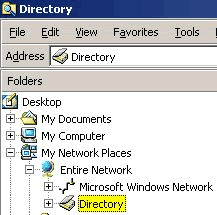
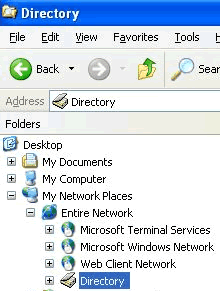
Windows 2000 users can easily browse Active Directory by opening My Network Places > Entire Network. But this active directory browsing is disabled by design under Windows XP. To have this feature in Windows XP, simply copy "dsfolder.dll" from Windows 2000 (sp2 or higher) "%WINDIR%\system32" to Windows XP "%WINDIR%\system32". After that, use "regsvr32" command-line tool to register the dll by entering "regsvr32 dsfolder.dll" at the command prompt. Now you will be able to see the Active Directory icon whenever you go to My Network Places > Entire Network. Hard to find Windows 2000? Read here.
Wednesday, January 09, 2008
Microsoft Office 2007 - Office Open XML

When somebody came to you and ask "I cannot seem to open files with .pptx extensions. Can you?"
.pptx is the new Microsoft Office 2007 - Office Open XML format for PowerPoint presentations. Microsoft Office 2007 uses a new Office Open XML format that is not understood by previous versions of the software. For Microsoft Office XP and 2003 users, you may overcome this incompatibility by installing the Microsoft Office Compatibility Pack. After updating,
you may test your software with sample Open XML documents provided by openxmldeveloper.org. Anyway, it is recommended for users to install all High-Priority updates from Microsoft Update before downloading the Compatibility Pack.
If you don't really like this new format, you might consider to sign a petition of "NO to the Microsoft Office format as an ISO standard", please visit http://www.noooxml.org/petition.
Subscribe to:
Posts
(
Atom
)

 Posts


