Showing posts with label desktop. Show all posts
Tuesday, April 15, 2008
MS Outlook icon recovery
Need to recover accidentally deleted MS Outlook icon from desktop? Open Registry Editor, go to;
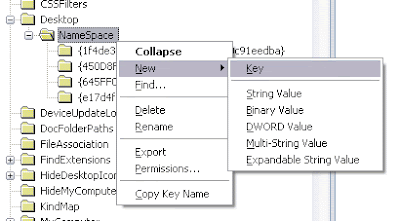
Add new key to folder NameSpace and paste code below as the key name;

Now refresh your desktop
HKEY_LOCAL_MACHINE > SOFTWARE > Microsoft > Windows > CurrentVersion > Explorer > Desktop > NameSpaceAdd new key to folder NameSpace and paste code below as the key name;
{00020D75-0000-0000-C000-000000000046}Now refresh your desktop
Wednesday, February 20, 2008
Recreate Show Desktop Icon
Show Desktop icon near the Windows XP start button is used to minimize all active windows. The icon/button is located on your Quick Launch bar. This Quick Launch bar folder location is at %appdata%\Microsoft\Internet Explorer\Quick Launch.


Sometimes, people accidentally deleted this icon. To recover this icon/button, you can try to;
Remember to save the file with .scf extension. If everything goes well, the file icon should appear as below automatically.

Sometimes, people accidentally deleted this icon. To recover this icon/button, you can try to;
- Copy the icon from other users %appdata%\Microsoft\Internet Explorer\Quick Launch folder.
- Copy the icon from others machine with Windows XP that still have it on the same location.
- Search the icon entire drive for Show Desktop file (*.scf extension)
- Search the icon in i386 folder from Windows XP installer CD or DVD.
- Create a new icon/button.
[Shell]
Command=2
IconFile=explorer.exe,3
[Taskbar]
Command=ToggleDesktop
Remember to save the file with .scf extension. If everything goes well, the file icon should appear as below automatically.
Subscribe to:
Posts
(
Atom
)

 Posts


