Showing posts with label toad. Show all posts
Sunday, October 18, 2009
Toad 9.7 & Oracle Instant Client 11.1
Referring to Toad + Oracle instant client, I tried to set it up but unfortunately it doesn't work out for me. Some extra additional steps help to resolve the issue and I love to share it here.
First, download Oracle Client from Oracle Database Instant Client. Instant Client Package - Basic Lite wil do just fine. (about 17MB)
Next, create 4 folders ( recommended under c:\Program Files ) according to folder hierarchy below;
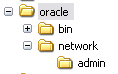
You should have 4 folders.
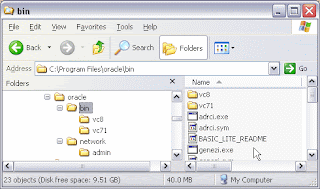
Now, extract the Instant Client Package to C:\Program Files\oracle\bin ( make sure the oci.dll is in the C:\Program Files\oracle\bin )
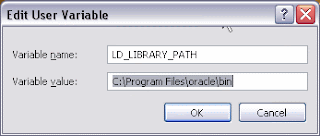
Right click at My Computer > Properties > Goto Advance tab > Click Environment Variables. Add listed Environment Variables below to your OS.
Under system variables, edit Path, add C:\Program Files\oracle\bin to the end of other path (don't forget to separate it with ";")

Copy/create 3 simple *.ora files below to C:\Program Files\oracle\network\admin
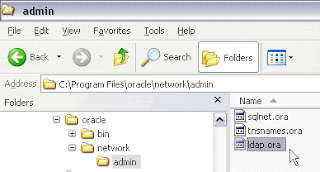
tnsnames.ora
sqlnet.ora
ldap.ora
Finally, test it out.
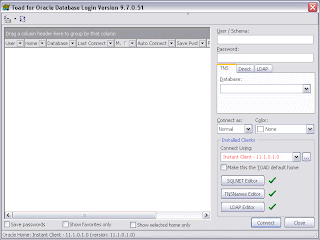
The drop down button seems to be highlighted in red but it works. I've tried it with several DB connections.
First, download Oracle Client from Oracle Database Instant Client. Instant Client Package - Basic Lite wil do just fine. (about 17MB)
Next, create 4 folders ( recommended under c:\Program Files ) according to folder hierarchy below;

You should have 4 folders.
C:\Program Files\oracle
C:\Program Files\oracle\bin
C:\Program Files\oracle\network
C:\Program Files\oracle\network\admin
Now, extract the Instant Client Package to C:\Program Files\oracle\bin ( make sure the oci.dll is in the C:\Program Files\oracle\bin )

Right click at My Computer > Properties > Goto Advance tab > Click Environment Variables. Add listed Environment Variables below to your OS.
LD_LIBRARY_PATH = C:\Program Files\oracle\bin
ORACLE_HOME = C:\Program Files\oracle
ORACLE_HOME_NAME = C:\Program Files\oracle
SQL_PATH = C:\Program Files\oracle
TNS_ADMIN = C:\Program Files\oracle\network\admin
Under system variables, edit Path, add C:\Program Files\oracle\bin to the end of other path (don't forget to separate it with ";")

Copy/create 3 simple *.ora files below to C:\Program Files\oracle\network\admin

tnsnames.ora
DEV =
(DESCRIPTION =
(ADDRESS_LIST =
(ADDRESS = (PROTOCOL = TCP)(HOST = foo)(PORT = 1531))
)
(CONNECT_DATA =
(SERVICE_NAME = foo)
)
)
sqlnet.ora
NAMES.DIRECTORY_PATH= (LDAP, TNSNAMES, HOSTNAME)
NAMES.DEFAULT_DOMAIN = WORLD
TRACE_LEVEL_CLIENT = OFF
SQLNET.EXPIRE_TIME = 30
ldap.ora
DEFAULT_ADMIN_CONTEXT = “ou=oracledatabases,dc=mycompany,dc=com”
DIRECTORY_SERVERS = (ldap_server.mycompany.com:389:636)
DIRECTORY_SERVER_TYPE = OID
Finally, test it out.

The drop down button seems to be highlighted in red but it works. I've tried it with several DB connections.
Subscribe to:
Posts
(
Atom
)

 Posts


