Showing posts with label java. Show all posts
Thursday, August 05, 2010
YUI Compressor with GUI
Minification is the process of removing all unnecessary characters from source code such as
white space characters, new line characters, comments and block delimiters
without changing its functionality. [read more...]
Minified code reduces the amount of data that needs to be transferred through the web server (bandwidth saving).
It may also be used as a kind of obfuscation.
My favorite minification tool is YUI Compressor.
Mostly for CSS (Cascading Style Sheets) and JS (JavaScript).
Let us taka a look what happen when a simple code get minified.
JavaScript - Original Code
You need to have Java installed in order to run this executable JAR.

Download (MD5 : 210176c93d331c50dc19a2dda0ae1c89 JsCssMin.jar)
white space characters, new line characters, comments and block delimiters
without changing its functionality. [read more...]
Minified code reduces the amount of data that needs to be transferred through the web server (bandwidth saving).
It may also be used as a kind of obfuscation.
My favorite minification tool is YUI Compressor.
Mostly for CSS (Cascading Style Sheets) and JS (JavaScript).
Let us taka a look what happen when a simple code get minified.
JavaScript - Original Code
function startTime(){
    var today=new Date();
    var h=today.getHours();
    var m=today.getMinutes();
    var s=today.getSeconds();
    // add a zero in front of numbers<10
    m=checkTime(m);
    s=checkTime(s);
    document.getElementById('txt').innerHTML=h+":"+m+":"+s;
    t=setTimeout('startTime()',500);
}

function checkTime(i){
    if (i<10){
        i="0" + i;
    }
    return i;
}
JavaScript - Minified function startTime(){var b=new Date();var d=b.getHours();
var a=b.getMinutes();var c=b.getSeconds();a=checkTime(a);
c=checkTime(c);document.getElementById("txt").innerHTML=d+":"+a+":"+c;
t=setTimeout("startTime()",500)}function checkTime(a){if(a<10){a="0"+a
}return a};
CSS - Original Code body
{
background-color:#d0e4fe;
}
h1
{
color:orange;
text-align:center;
}
p
{
font-family:"Times New Roman";
font-size:20px;
}
CSS - Minfied body{background-color:#d0e4fe;}h1{color:orange;text-align:center;}
p{font-family:"Times New Roman";font-size:20px;}
Just to share here, since YUI Compressor don't provide any GUI, I've created one with Java Swing. It has been compiled together with yuicompressor-2.4.2.jar.You need to have Java installed in order to run this executable JAR.

Download (MD5 : 210176c93d331c50dc19a2dda0ae1c89 JsCssMin.jar)
Thursday, October 15, 2009
Setting up a simple Java stored procedure/function in Oracle
Starting with Oracle 8i, we can write Java Stored Procedures/Functions within the database. Stored procedures/functions are Java methods published to SQL and stored in the database for general usage. It also could be called by a trigger. Example; to send an email whenever a specific row has been inserted into the table.
Run the $ORACLE_HOME/javavm/install/initjvm.sql script from SYS AS SYSDBA to install the Oracle JServer Option on a database.
(This process is reversible. It could be done by running the rmjvm.sql script to uninstall the Oracle JServer Option from the database)
Grant JAVAUSERPRIV to selected user.
You could use a console but I'm using Toad by Quest Software for the next step. Create Java source from TOAD by login to the Oracle using the Java granted user.

Now verify the created Java method from the Java tab under schema browser.

Next, create a procedure/function to call the Java method. Remember, function should return one value but procedure don't.

Finally, test it out with a simple SELECT FROM DUAL SQL.

Run the $ORACLE_HOME/javavm/install/initjvm.sql script from SYS AS SYSDBA to install the Oracle JServer Option on a database.
oracle@myserver:~> sqlplus '/ as sysdba' @$ORACLE_HOME/javavm/install/initjvm.sql(This process is reversible. It could be done by running the rmjvm.sql script to uninstall the Oracle JServer Option from the database)
Grant JAVAUSERPRIV to selected user.
oracle@myserver:~> sqlplus '/ as sysdba'
SQL> GRANT JAVAUSERPRIV TO theuser;

Grant succeeded.
You could use a console but I'm using Toad by Quest Software for the next step. Create Java source from TOAD by login to the Oracle using the Java granted user.

CREATE OR REPLACE AND RESOLVE JAVA SOURCE NAMED "Hello" AS
public class hello{
public static String world() {
return "hello world ";
}
};
/
Now verify the created Java method from the Java tab under schema browser.

Next, create a procedure/function to call the Java method. Remember, function should return one value but procedure don't.

CREATE OR REPLACE function Hello RETURN VARCHAR2
as LANGUAGE JAVA NAME 'hello.world() return String';
/
Finally, test it out with a simple SELECT FROM DUAL SQL.

Wednesday, January 30, 2008
JDK vs JRE vs J2SE vs J2EE vs J2ME ?
Which Java should I download? Can I just download the minimum small file size Java? Well, it depend on what are you need it for. Below explains;
JDK = Java Development Kit
Contains all of the software needed to compile Java source files (.java) into bytecode (.class)
JRE = Java Runtime Environment
Software needed to run the bytecode.
The JRE does come with the JDK. So, if you just want to run Java program, downloading JRE will do. The JRE installer is about 15MB while the JDK installer is about 55MB.
Quick introduction about Java? Read here.
J2SE = Java 2 Standard Edition
JDK + JRE, Java development package.
J2EE = Java 2 Enterprise Edition
JDK + JRE, advance Java development package.
J2ME = Java 2 Micro Edition
JDK + JRE, for handheld devices (cellular phones, palmtops etc.)
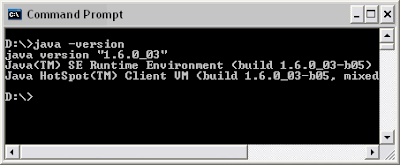
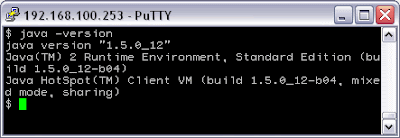
Quick way to know your Java version? Type java –version on your dos or shell prompt.
Java version example on WinXP command prompt
Java version example on Solaris 10 shell through PuTTY
More Java version checking methods can be found here
JDK = Java Development Kit
Contains all of the software needed to compile Java source files (.java) into bytecode (.class)
JRE = Java Runtime Environment
Software needed to run the bytecode.
The JRE does come with the JDK. So, if you just want to run Java program, downloading JRE will do. The JRE installer is about 15MB while the JDK installer is about 55MB.
Quick introduction about Java? Read here.
J2SE = Java 2 Standard Edition
JDK + JRE, Java development package.
J2EE = Java 2 Enterprise Edition
JDK + JRE, advance Java development package.
J2ME = Java 2 Micro Edition
JDK + JRE, for handheld devices (cellular phones, palmtops etc.)
Quick way to know your Java version? Type java –version on your dos or shell prompt.
Java version example on WinXP command prompt
Java version example on Solaris 10 shell through PuTTY
More Java version checking methods can be found here
Subscribe to:
Posts
(
Atom
)

 Posts


