Showing posts with label google chrome. Show all posts
Thursday, September 04, 2008
Copy FLV file from Google Chrome cache
cache
,
flv
,
google chrome
,
youtube
5 comments
:
To copy FLV from Google cache, the method is similar to copy FLV from Firefox cache. The cache location is at;
C:\Documents and Settings\YourLogin\Local Settings\Application Data\Google\Chrome\User Data\Default\Cache
Or
%AppData%\..\Local Settings\Application Data\Google\Chrome\User Data\Default\Cache
The method is quite similar, open explorer and go to cache folder like mentioned above.
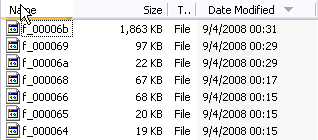
Now watch full Youtube video in Google Chrome browser. Do not close your browser yet after that. Back to the cache folder, refresh it using F5 key and now you can see some new large file created in the folder. Sort by date modified for better visibility.
Copy it somewhere and rename it to *.flv . Now you may play the FLV using a favorite player.


C:\Documents and Settings\YourLogin\Local Settings\Application Data\Google\Chrome\User Data\Default\Cache
Or
%AppData%\..\Local Settings\Application Data\Google\Chrome\User Data\Default\Cache
The method is quite similar, open explorer and go to cache folder like mentioned above.

Now watch full Youtube video in Google Chrome browser. Do not close your browser yet after that. Back to the cache folder, refresh it using F5 key and now you can see some new large file created in the folder. Sort by date modified for better visibility.
Copy it somewhere and rename it to *.flv . Now you may play the FLV using a favorite player.


Subscribe to:
Posts
(
Atom
)

 Posts
Posts


